
My Inspiration
It's pretty simple really. With AI becoming so popular over the past few years, I thought--why not give it a shot? For one of my school's clubs, we were organizing a week-long hackathon, and it would feel silly if I didn't contribute anything.
But what would the project be? Well. We've all had frustrations with voice activated assistants, like Siri, Alexa, and the like. So why not try to challenge them?
Starting Out
The stack for Apex began really simple. I was using SvelteKit, along with PocketBase. Two really well established tools that make it much faster to get your ideas out there, without having to worry about too many potential technical issues. After all, this had to work for a live demo.
Also, Cloudflare AI was in beta at the time, and offered (still does) a really generous free plan that includes access to all of their models. Including voice transcription and LLMs. Perfect for this project.
In a previous article, I talked about using LLaMA on Cloudflare, so I'll continue to use a similar setup to that. The difference here though, is that PocketBase will be integrated and allow for a chat history.
I won't be going fully into the UI I created, but the project is open source on my GitHub for those who are curious how that aspect worked.
Structure
The structure is pretty simple. It's separated into two folders, one for the SvelteKit client, and another for the Express server. There's also the required PocketBase instance, but that's to be hosted on another server.
How It Works
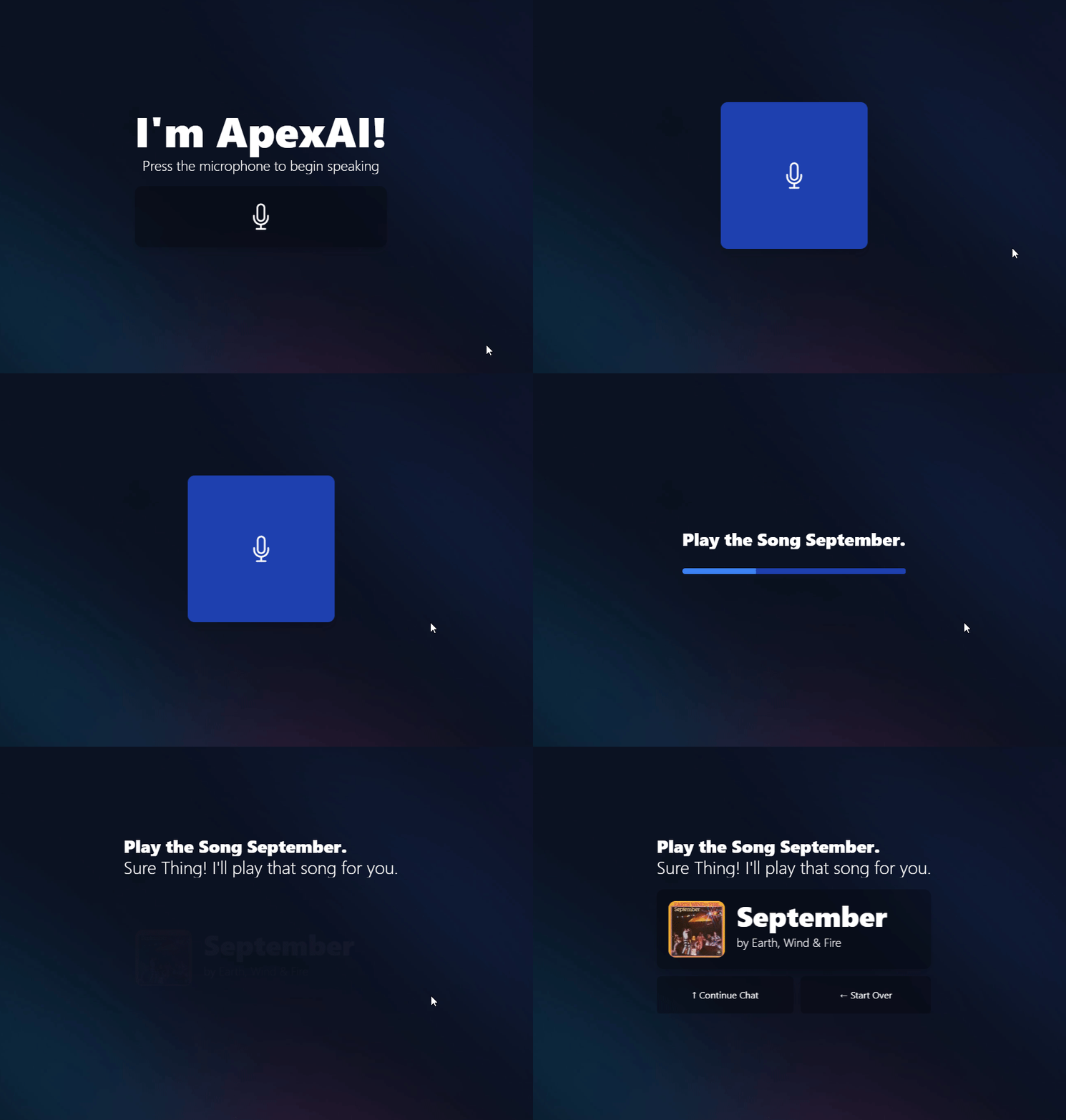
Essentially, the app consists of a microphone button in the middle of the screen that--when pressed--triggers the user's microphone. This then captures the data, and forwards it to the server.

Pictured above is what you could expect from using the app.
However, capturing the browser mic input wasn't as simple as this. When attempting to playback any voice files sent to the server, they would always end up being corrupt. This was solved using an additional server-side processing layer of having ffmpeg. The implementation was pretty simple.
const ffmpeg = require('fluent-ffmpeg');

const encode = (path) => {
	return new Promise((res, rej) => {
		ffmpeg(`${__dirname}/temp/${path}.wav`).output(`${__dirname}/temp/${path}.mp3`).on('end', () => {
			return res();
		}).run();
	});
};

module.exports = { encode };
Now onto the more interesting aspect... The APIs.
The Express project is using multer, which allows for direct file uploads into the temporary folder. This is also the point where we initialize a new chat in the database (more on that later).
const upload = multer({ storage: storage });

app.post('/upload/:id', upload.single('audio'), async (req, res) => {
    if (!req.query.chat) {
        const id = await db.create_chat();
        await encode(req.params.id);
        return res.send({ id: id });
    } else {
        const id = req.query.chat;
        await encode(req.params.id);
        return res.send({ id: id });
    }
});
From here, the encode function is called, which corresponds to the ffmpeg processing layer above. After receiving an ID from the server, the client makes another request to transcribe the audio.
//index.js
app.get('/transcribe/:id', async (req, res) => {
    let path = await audio_exists(req.params.id);
    if (!path) return res.sendStatus(404);
    let text = await audio_to_text(req.params.id);
    return res.send({ response: text });
});

//modules/transcribe.js
const axios = require('axios');
const fs = require('fs');
const { Blob } = require('buffer');

const audio_exists = async (path) => {
    let fullpath = `${__dirname}/temp/${path}.wav`;
    if (fs.existsSync(fullpath)) return fullpath;
    return false;
};

const audio_to_text = (file) => {
    return new Promise(res => {
        console.log(`Transcribing text from audio`);

        const buffer = fs.readFileSync(`${__dirname}/temp/${file}.mp3`);
        const blob = new Blob([buffer]);

		//The Cloudflare OpenAI Whisper API takes the file as a blob

        axios({
            method: 'post',
            url: `https://api.cloudflare.com/client/v4/accounts/${process.env.CLOUDFLARE_ACCOUNT}/ai/run/@cf/openai/whisper`,
            headers: {
                Authorization: `Bearer ${process.env.CLOUDFLARE_API}`
            },
            data: blob
        }).then(data => {
            let text = data?.data?.result?.text;
            console.log(`Successfully transcribed ${text}`);
            return res(text);
        });
    });
};

module.exports = { audio_to_text, audio_exists };
After that, the response is sent back to the client. Now we're able to feed it into the LLM.
//index.js
app.get('/text', async (req, res) => {
    if (!req.query.q) return res.sendStatus(401);
    let response = await ai(req.query.q);
    return res.send(response);
});

//modules/ai.js
const ai = (text, c) => {
    return new Promise(async (res) => {
        console.log(`Generating AI response to: ${text}`);
        let d = new Date().toString();

		//This is my really simplistic system prompt. It gets the job done, and doesn't use that many tokens while doing it.
        let chat = {
            messages: [
                { role: 'system', content: 'You are Apex, a friendly desk side assistant. Your answers should be very short. The current time is ' + d }
            ]
        };

		//See "Conversations" section in the article
        let messages = await db.fetch_chat(c);

        if (messages?.items) {
            messages.items.forEach(item => {
                chat.messages.push({ role: "user", content: item.message });
                chat.messages.push({ role: "assistant", content: item.response });
            });
        }

        chat.messages.push({ role: 'user', content: text });

        axios({
            method: 'post',
            url: `https://api.cloudflare.com/client/v4/accounts/${process.env.CLOUDFLARE_ACCOUNT}/ai/run/@cf/meta/llama-2-7b-chat-int8`,
            headers: {
                Authorization: `Bearer ${process.env.CLOUDFLARE_API}`
            },
            data: JSON.stringify(chat)
        }).then(data => {
            return res(data.data?.result?.response?.replace(/\*([^*]+)\*/g, ""));
        });
    });
};
LLaMA sometimes struggles with providing answers to more detailed questions. But for basic knowledge questions (while also being a bit smarter than some other voice assistants), it's sufficient enough.
Finally, the text to speech. Thankfully, ElevenLabs thoughtfully created a Node API to make things much easier to work with.
const ElevenLabs = require("elevenlabs-node");

const voice = new ElevenLabs(
    {
        apiKey: process.env.ELEVENLABS_API,
		//A nice British voice
        voiceId: "onwK4e9ZLuTAKqWW03F9",
    }
);

const tts = (text) => {
    return new Promise((res, rej) => {
        console.log(`Speech Processing`);

        let d = (new Date()).getTime();

        voice.textToSpeech({
            fileName: `${__dirname}/temp/${d}.mp3`,
            textInput: text,
        }).then((r) => {
            console.log('Speech Processing Complete');
            return res({ id: d, text: text });
        });
    });
};

module.exports = { tts };
From there, it's just the job of sending both the transcription, and text to speech generation back to the frontend UI. This is essentially how the application works, and it's decently fast as well.
Conversations
You may have noticed how when the initial audio clip was uploaded, an ID was generated. For future messages in this conversation, this is really important to make sure it still knows what you're saying.
const PocketBase = require('pocketbase/cjs');

const pb = new PocketBase(`https://apexai.pockethost.io/`);

const auth = pb.admins.authWithPassword(process.env.PB_EMAIL, process.env.PB_PASSWORD);

const db = {};

//On each access to the LLM, the context has to be fetched.
db.fetch_chat = async (id) => {
	if (!pb.authStore.isValid) return false;
	try {
		let chat = await pb.collection('chats').getOne(id);
		let messages = await pb.collection('messages').getList(1, 5, {
			filter: `chat.id = "${id}"`,
			sort: '+created'
		});
		return messages;
	} catch (e) {
		return false;
	}
};

//For each transcription, its content is pushed into here. The same with LLM responses.
db.create_message = async (chat, message, response) => {
	if (!pb.authStore.isValid) return false;
	try {
		const record = await pb.collection('messages').create({
			message: message,
			response: response,
			chat: chat
		});
		return record.id;
	} catch (e) {
		return false;
	}
};

//This is the first function called, creates a chat with the current time and ID.
db.create_chat = async () => {
	if (!pb.authStore.isValid) return false;
	try {
		const record = await pb.collection('chats').create({
			time: new Date().getTime()
		});
		return record.id;
	} catch (e) {
		return false;
	}
};

module.exports = { db };
Once you maintain a proper JSON with the messages sent and received, it can really feel like you're having an actual conversation.
Conclusion
This pretty much wraps it up. I just wanted to write a quick article showing my intentions with creating this project, and documenting some of the learning I did along the way. I had a great time working on this project, even if it is a bit rough around the edges, it gets the job done.
It's also pretty easy to extend as well. Within a few minutes, I implemented support for my music streaming platform Sonata, shown below.
Hopefully this article was able to serve some purpose to someone. You can find the full GitHub Project here. Here's the Devpost as well.
Thanks for reading my post! Have a great rest of your day!